
A market price answers "what does this gun go for". It says nothing about the four stickers someone put on it, and that is where the money often is: a rifle worth 30 euro can be carrying a sticker worth ten times that. Until you check them one by one, an inventory full of stickered weapons is priced as if the stickers were not there.
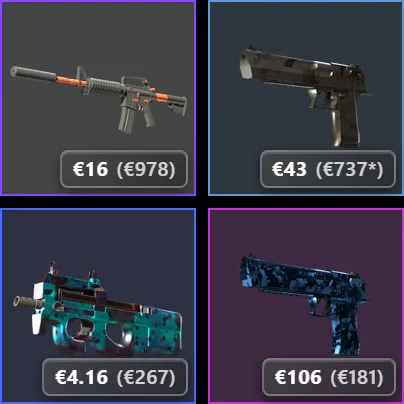
On the tile: the weapon, then the brackets
Open the Counter-Strike 2 tab of any Steam inventory and every tile gets a price pill. When the weapon carries stickers or a charm, the pill gains a second number in brackets: the sum of those accessories. A star after it means at least one of them had no price anywhere, so the sum is a floor rather than the full figure. Nothing is estimated to fill the gap.
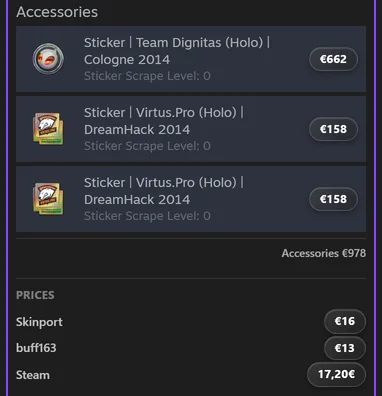
Open the item: a price on every sticker
Clicking a weapon opens Steam's own details panel, and Pulse puts a price on each sticker and charm where it already sits, next to its name. That is the part a single sum cannot do: four stickers on one rifle are rarely worth the same, and usually one of them carries almost all of the value.
The whole inventory, in one line
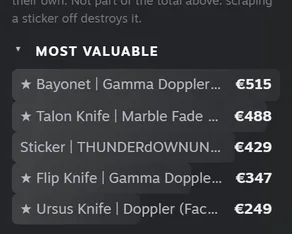
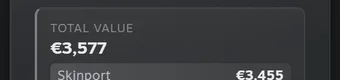
The column beside the grid has an Accessories line: what every sticker and charm you own is worth together, on how many items they sit, and how many had no price. On the inventory in the screenshots that comes out at 4,824 euro of accessories on an inventory worth 3,577 euro, spread over 30 of its 74 items, with six left unpriced. Stickers are not a rounding error.
Read that number honestly
This is the price of the accessory on its own, the way it sells in the market as a fresh sticker. It is not a bonus you can add to the skin and it is not money you can take out. Scraping a sticker off destroys it, and a weapon with stickers applied usually sells for the price of the weapon plus a fraction of what is on it, decided by whoever is buying. That is exactly why Pulse keeps this total out of the inventory value and shows it on its own line instead.
Sort by what is stuck on them
Beside the sort buttons for value, rarity and type there is now Stickers, which orders the whole inventory by accessory value. It answers a question the plain value sort cannot: which of these guns is worth opening, rather than which gun is expensive by itself.
Charms count too
Charms are priced the same way and show up in the same brackets, whatever Steam calls them: a charm, a souvenir charm or a sticker slab. They sit on the last row of the item panel, and like stickers they are priced as the loose item.
Where the prices come from
The same place as the rest of the inventory: Skinport first, buff163 behind it to fill the gaps. A sticker nobody has listed anywhere stays unpriced instead of getting an invented number, which is why the panel counts those separately and the tile marks an incomplete sum with a star. The whole thing runs on public data, on any public inventory, with no account and no trade link.
If you want the bigger picture first, the companion piece walks through pricing a whole inventory item by item, and what the value badge next to a nickname means explains the single number the badge shows.