
To see someone's Faceit ELO from Steam, use a browser extension that resolves their Steam ID to the Faceit account attached to it and prints the numbers on the profile page. With Pulse installed you visit the profile the way you normally would, and the ELO is sitting in a panel under the profile summary. You do not need the player's Faceit nickname, and you do not need to guess at it: the lookup runs on the SteamID64, so a custom vanity URL or a recent name change still resolves to the right account.
Step by step
- Install Pulse in Chrome or Firefox, links are at the bottom of this page
- Open any profile on
steamcommunity.com - Scroll to the Pulse panel and read the Faceit section
There is no account to create, no login, and no API key to paste anywhere. Pulse asks for a
single permission, storage, which it uses to remember your own settings.
What the Faceit section shows
ELO is the headline number, next to the level it maps to. Alongside it you get the player's winrate, their recent match results, and any active Faceit ban.
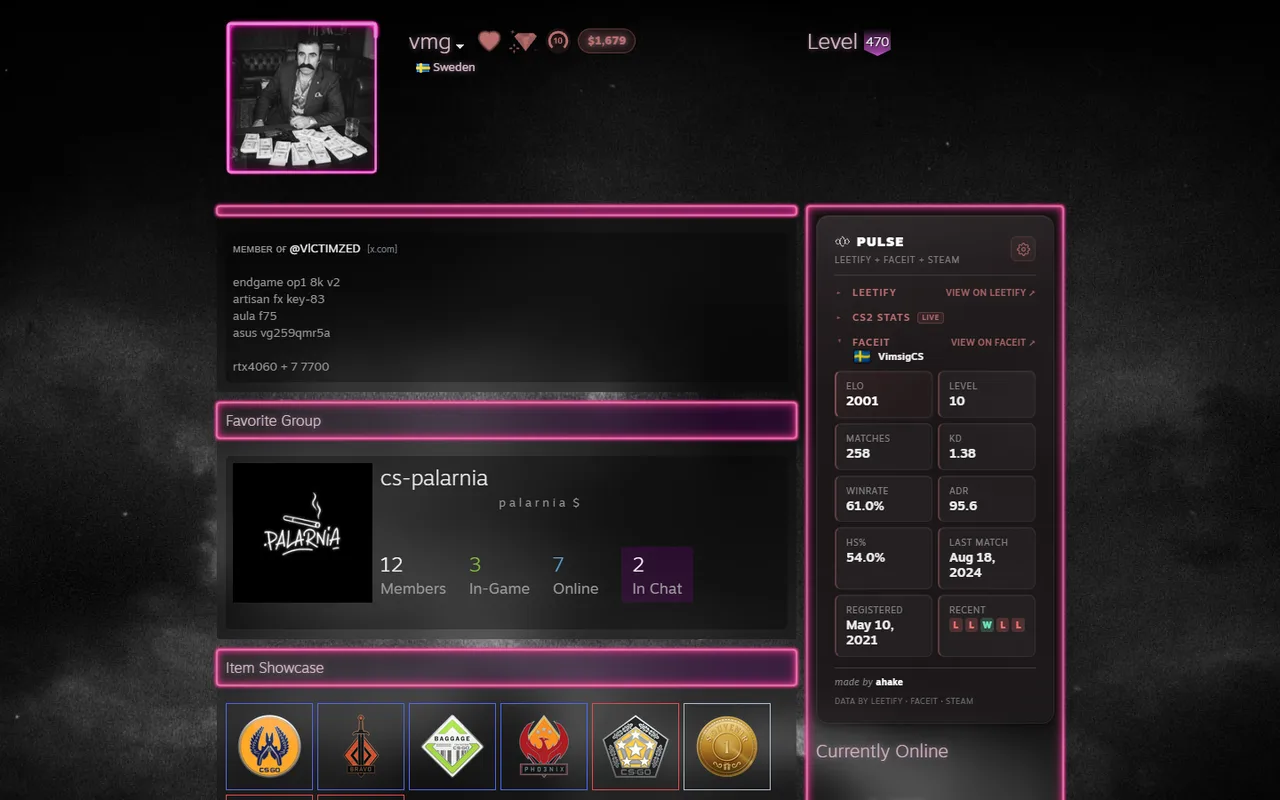
A Faceit level badge also appears next to the nickname at the top of the profile, which is usually enough to size someone up before you scroll at all.
ELO and level are two different facts
The level is a band; the ELO is the position inside it. The difference matters most at the top, because the highest level has no ceiling: two accounts can both wear a level 10 badge and not be remotely close in practice. So the badge next to the nickname is the quick read, and the ELO in the panel is the number you fall back on once the badge has stopped separating people from each other.
Peak ELO, sitting next to the current one
The panel also carries the highest ELO the account has ever reached, and hovering it says when that happened. If the current ELO is itself the record, the tooltip says that instead of a date. Some accounts have no ELO history to read at all; rather than show a dash, that tile steps aside and the account's registration date takes its place. That is a gap on Faceit's side rather than a failed lookup, and those same accounts come up blank in other tools for the same reason.
Why the lookup needs no nickname
Everything runs off the SteamID64, the seventeen-digit number behind every Steam account. Names change, and custom profile addresses get recycled: a vanity URL you remember from years ago can be sitting under a different account today. The numeric id never moves, so it is the only identifier worth resolving against, and it is why a recent rename does not break the result.
If no ELO appears
Not every Steam account has a Faceit account attached to it. When there is no link to follow, the section says so rather than inventing a number. Nothing is fetched in the background either: data is requested only at the moment you open a profile. The privacy policy covers what that request contains.
It works inside the Steam client too
The panel renders in the Steam client's own browser, not just in a normal browser tab. That means profiles you open from a friends list, a lobby, or a match scoreboard get the same Faceit numbers without a detour through your desktop browser.
Pulse is free. Grab it for Chrome and Chromium browsers or for Firefox, then open a profile. More about the panel on the homepage.
Common questions
Do I need a Faceit account to check someone's ELO? No. You do not need an account, a login, or a Faceit API key. The panel appears on the Steam profile whether or not you have ever played on Faceit yourself.
Why does the Faceit section on a Steam profile show nothing? Because that Steam account has no Faceit account attached to it. There is no link to follow, so the section says so instead of printing a number it made up.
Is the Faceit ELO shown live? It is fetched when you open the profile, and a recent answer may be reused briefly so that reopening the same profile does not repeat the request. Nothing is collected in the background between visits.
Does a Faceit ban show up on the Steam profile? Yes. An active ban is shown where the level badge would sit, and the section shows the ban rather than the statistics, because the ban is the more important fact about that account.